
AbsoluteTelnet Telnet / SSH Client10.16 - Download
You'll be able to download in few seconds.
Publisher Description
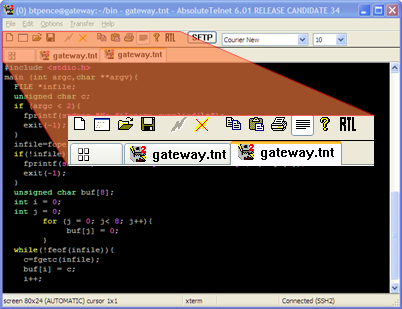
AbsoluteTelnet/SSH is a FIPS validated SSH terminal client that also supports telnet, SFTP, dialup, and serial connectivity in dockable tabbed multi-session interface or the classic single-session interface. A wide range of emulations are provided, including VT100, VT220, VT320, XTERM, WYSE60, ANSI, SCO-ANSI, ANSI-BBS, and QNX. Packed with options such as SOCKS5, IPV6, Arabic shaping, BIDI (bidirectional text), and IDNA (International Domain Names for Applications), Absolute is sure to support the technology you need! Absolute supports single-sign-on capability through advanced authentication features such as smartcard and GSSAPI (ActiveDirectory, Kerberos, and NTLM). Encryption options such as Blowfish, Twofish, AES, Arcfour, 3DES, Cast128, IDEA, and RC4 provide maximum security in today's insecure environments. SFTP, Xmodem, ymodem, and zmodem protocols provide extensive file-transfer support. Also supports serial ports greater than COM9 and has a variable scrollback size. Localized for: English, Chinese, Portuguese
About AbsoluteTelnet Telnet / SSH Client
This Terminal & Telnet Clients program is available in English, Chinese, ChineseSimplified, French, German, Hungarian, Norwegian, Portuguese, Russian, Spanish. It was last updated on 29 September, 2026. AbsoluteTelnet Telnet / SSH Client is compatible with the following operating systems: Windows.
The company that develops AbsoluteTelnet Telnet / SSH Client is Celestial Software. The latest version released by its developer is 10.16.
The download we have available for AbsoluteTelnet Telnet / SSH Client has a file size of 3.1 MB. Just click the green Download button above to start the downloading process. The program is listed on our website since 2016-07-14 and was downloaded 0 times. We have already checked if the download link is safe, however for your own protection we recommend that you scan the downloaded software with your antivirus. Your antivirus may detect the AbsoluteTelnet Telnet / SSH Client as malware if the download link is broken.
How to install AbsoluteTelnet Telnet / SSH Client on your Windows device:
- Click on the Download button on our website. This will start the download from the website of the developer.
- Once the AbsoluteTelnet Telnet / SSH Client is downloaded click on it to start the setup process (assuming you are on a desktop computer).
- When the installation is finished you should be able to see and run the program.
Program Details
General
System requirements
Download information
Pricing
Version History
version 10.16
posted on 2016-07-14
Windows 10 support, HKSCS character set, Cisco IOS, Dynamic port forwarding, DoD CAC support, Dockable tabs, scripting, FIPS validation, GUI SFTP client, smartcard authentication, GSSAPI authentication, IPV6, tabbed interface
version 9.53
posted on 2012-11-24
Dynamic port forwarding, DoD CAC support, Dockable tabs, scripting, FIPS validation, GUI SFTP client, smartcard authentication, GSSAPI authentication, IPV6, tabbed interface
Disclaimer
External Download
We do not host AbsoluteTelnet Telnet / SSH Client on our servers. We did not scan it for viruses, adware, spyware or other type of malware. This app is hosted by the software publisher and passed their terms and conditions to be listed there. We recommend caution when installing it.
The external download link for AbsoluteTelnet Telnet / SSH Client is provided to you by apps112.com without any warranties, representations or guarantees of any kind, so access it at your own risk.
If you have questions regarding this particular app contact the publisher directly. For questions about the functionalities of apps112.com contact us.
